Field Research · Healthcare Technology
Uncovering Critical EMR Workflow Issues
Using observational research to identify and prioritize usability issues across a multisite pediatric practice.
- Role
- Usability Specialist, Research & Design Strategy
- Methods
- Field Study · Contextual Observation · Workflow Analysis
- Duration
- Two day field study
- Participants
- 8 staff members
- Output
- 18 usability findings · 11 actionable recommendations
The Challenge
Understanding the EMR in the context of real work
A multisite pediatric practice had used its electronic medical record system for nearly two decades, but staff continued to experience workflow issues that created extra work, uncertainty, and opportunities for error.
Our research team conducted an onsite field study to understand how the EMR fit into real clinical and administrative workflows and identify opportunities for improvement.
My role focused on contextual observation, synthesis, prioritization, and translating findings into product recommendations.
Research Questions
What challenges do staff experience while using the EMR?
Where does the system interrupt daily workflows?
Which features are helping or hindering staff?
Research Approach
Observing the workflow, not just the screen
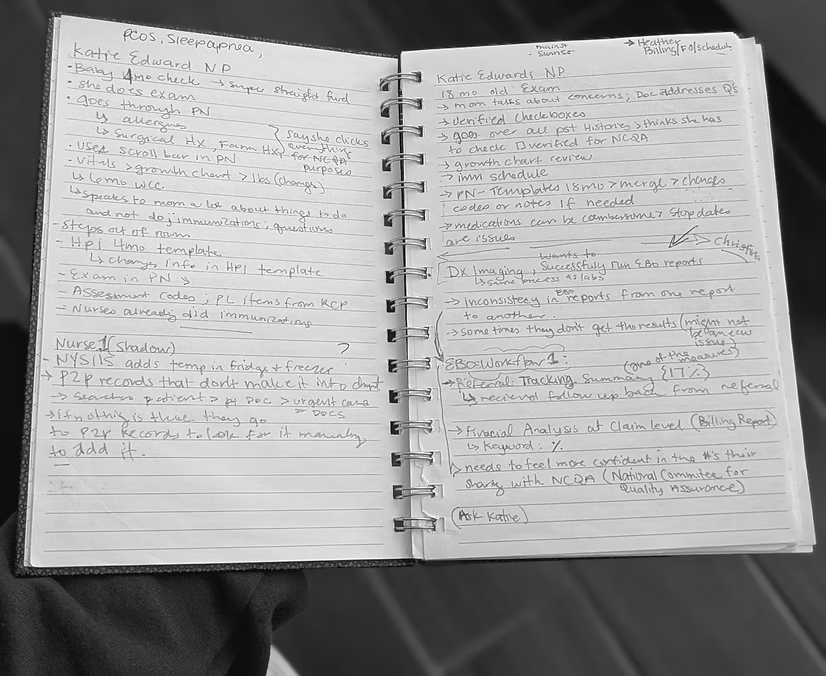
Over two days, we observed eight staff members during regular working hours across clinical and administrative environments.
Participants included nurses, front office staff, a medical assistant, and administrative personnel.
We observed how staff actually worked with the EMR, paying particular attention to pauses, system switching, repetitive steps, manual work, and workarounds.
18 Usability Findings
Patterns emerged across the practice
The field study surfaced usability issues across clinical, administrative, scheduling, reporting, and patient care workflows. Four themes represented some of the most consequential problems we observed.
Finding 01
Manual work created opportunities for error
Staff frequently entered incorrect immunization lot numbers, requiring manual auditing and inventory corrections. Lab results could also return as duplicate entries when codes did not match the original order, requiring staff to investigate and manually reconcile information.
Reduce repetitive data entry and automate workflows where manual intervention creates unnecessary risk.
Finding 02
Scheduling tools created preventable work
Configuring schedules for 10 providers could take approximately two days because date ranges had to be entered individually. Staff could also unknowingly attempt to book the same appointment slot because there was no concurrency notification.
Give staff better system feedback and reduce repetitive scheduling tasks.
Finding 03
Reporting created uncertainty
Practice managers relied on reporting data for operational decisions and external quality audits, but inconsistent results and unclear calculation requirements made it difficult to understand why scores differed between locations.
Make reporting logic more transparent so users can understand and trust the information they are presenting.
Finding 04
Clinical workflows increased cognitive load
Providers experienced frequent medication interaction alerts, contributing to alert fatigue. Some pediatric medication dosages required manual calculation or use of an external resource because the built in calculator did not support every medication.
Prioritize clinically meaningful alerts and reduce unnecessary mental calculation during patient care.
From Observations To Decisions
Not every usability issue carries the same weight
Finding usability issues was only the first part of the work. The next question was: Which problems should the team address first?
I applied a Usability Priority Scale that I co created with two UX mentors. We developed the framework to bring more consistency to how usability issues were evaluated, and it was later deployed to the broader UX team for collaborative prioritization.
Framework Dimensions
Can the user successfully complete the task?
How much mental effort does the task require?
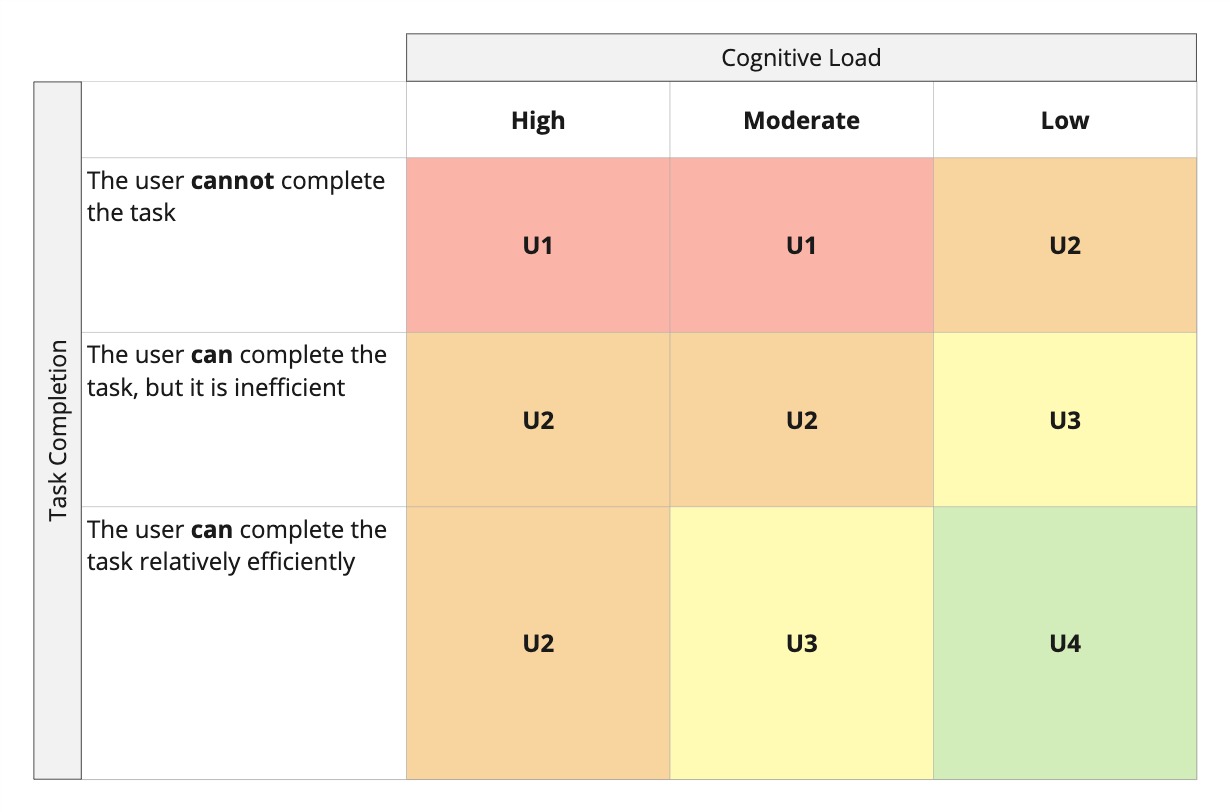
I used the framework to evaluate findings based on task completion and cognitive load, helping distinguish critical workflow barriers from lower impact usability issues and giving the team a shared way to discuss priority.
From Insight To Recommendation
Connecting observed friction to product opportunities
From the 18 findings, I translated prioritized issues into 11 actionable recommendations. The examples below show how key observations informed product recommendations.
Module 01: Immunization Management
Staff entered incorrect lot numbers and manually corrected inventory discrepancies.
Introduce barcode scanning for immunization entries and alert staff when inventory reaches zero.
Reduce manual entry and improve inventory accuracy.
Module 02: Appointment Scheduling
Multiple staff members could attempt to book the same appointment slot without knowing another user was already working in it.
Reintroduce or improve concurrency notifications.
Help prevent double bookings and scheduling conflicts.
Module 03: Reporting
Users struggled to understand why reports produced different results and what data was required to calculate scores.
Provide clearer report explanations and required data guidance.
Increase confidence when interpreting data used for quality audits and operational decisions.
Module 04: Medication Management
Frequent medication alerts contributed to alert fatigue, while some pediatric dosages required manual calculation.
Prioritize critical medication alerts and expand automatic dosage calculations.
Reduce unnecessary cognitive load and support safer clinical workflows.
Supporting Evidence
Configuring schedules for 10 providers could take approximately two days because date ranges had to be submitted individually.
Staff manually investigated duplicate lab results and used external resources to reconcile mismatched codes.
Incorrect lot number entry required manual auditing and inventory corrections.
Some pediatric medication dosages required manual calculation because the built in calculator did not support every medication.
Research Output
Turning field observations into actionable recommendations
The research gave product teams visibility into how the EMR was being used in a real pediatric environment, including workarounds, external tools, repetitive tasks, and workflow interruptions that may not have been apparent from system data alone.
Implementation and measurement after launch were outside the scope of this study. The benefits described in this case study represent recommended or potential outcomes rather than measured results.
REFLECTION
What this project reinforced
Observe the workflow, not just the screen
Watching people work in context exposed problems that would have been difficult to understand through interviews alone, including system switching, handwritten workarounds, repetitive processes, and interruptions.
Research needs prioritization
A long list of usability issues isn't enough. Translating findings through a prioritization framework helped connect user friction to task success, cognitive effort, and product decisions.
Small usability issues can compound across a workflow.
What appeared to be a small interaction problem could create downstream effects across staff workload, reporting, scheduling, and clinical care. The field study reinforced the importance of evaluating issues within the larger workflow rather than in isolation.